Speak.
It writes itself.
Dictation and meeting notes that run on your Mac. Free and open source.
Open Source EverythingmacOS 14 or later · Apple Silicon · Signed and notarized app in a .dmg
Hi Carla, I will send you the quote today before five. I will call you Tuesday so we can go over it together.
Hold Fn. Speak. Let go.
Works in any app where you can type. Whisper transcribes on your Mac. With Accessibility permission, Speak Away pastes the text at your cursor.
- Fn
Talk normally
Hold Fn to talk and let go to paste, or double tap Fn to dictate hands-free and tap once to finish. English and Spanish, with automatic language detection.
- Fn
The text lands where you write
The small pill shows listening and transcribing. With Accessibility permission, Speak Away pastes for you and then tries to put back what you had copied, unless you copied something else in between. Without Accessibility, Speak Away cannot paste for you.
- Gmail
- Slack
- Notion
- Terminal
- VS Code
- and anywhere you type
Dictation works offline after the model download from Hugging Face through WhisperKit: about 632 MB (precise, default) or 216 MB (fast). The default model downloads when you first open the app, and the other one the first time you pick it. A model downloads again only if its folder on your Mac is missing or incomplete. The Mac app’s only network requests go to Hugging Face, to download the model and, when they are not cached, small tokenizer files.
Your meetings, as notes you own.
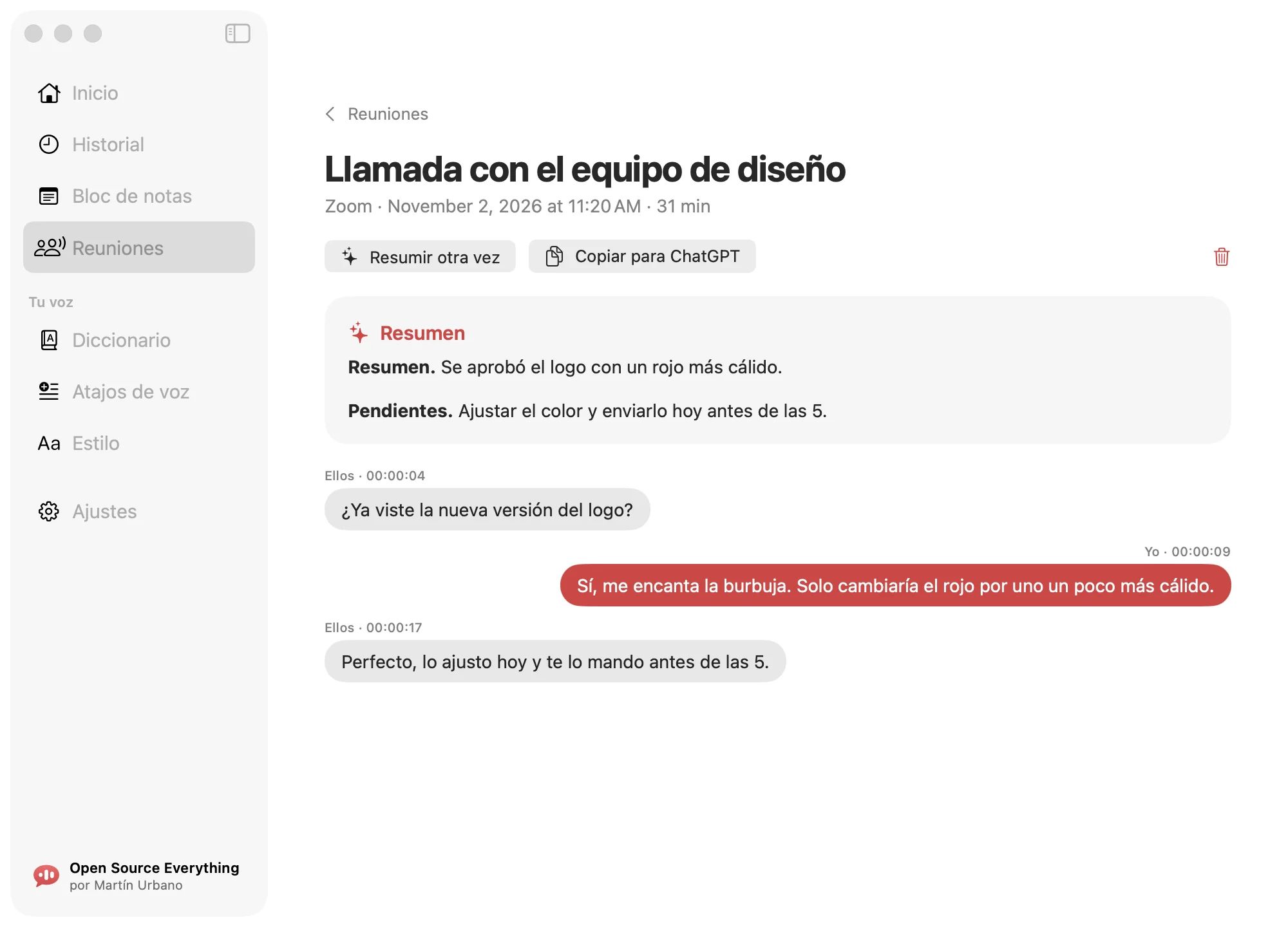
Available in v0.2.0. Speak Away transcribes live, recording your microphone and the sound your Mac plays as two separate tracks. The note has no summary until you press “Resumir” (Summarize).
A Markdown file on your Mac. Notes are saved as <date> <title>.md, with a .json beside each note for the app, in ~/Library/Application Support/Speak Away/Meetings/.
A summary when you ask for it. Press “Resumir” (Summarize) to add up to four sections: Resumen (summary), Decisiones (decisions), Tareas (action items) and Preguntas abiertas (open questions). A section with nothing in it is left out. Summaries use Apple’s on-device model and need macOS 26 with Apple Intelligence. “Resumir otra vez” (Summarize again) runs the summary again.
The app’s “Copiar para ChatGPT” button (Copy for ChatGPT) copies the notes as a ready to paste prompt. You can paste it into ChatGPT or Claude yourself to continue there.
System audio includes every sound your Mac plays except Speak Away’s own, so music or video playing during a meeting can end up in the transcript. Audio is never written to storage. A temporary live journal of the transcript is deleted when the note is saved.
Make it yours.
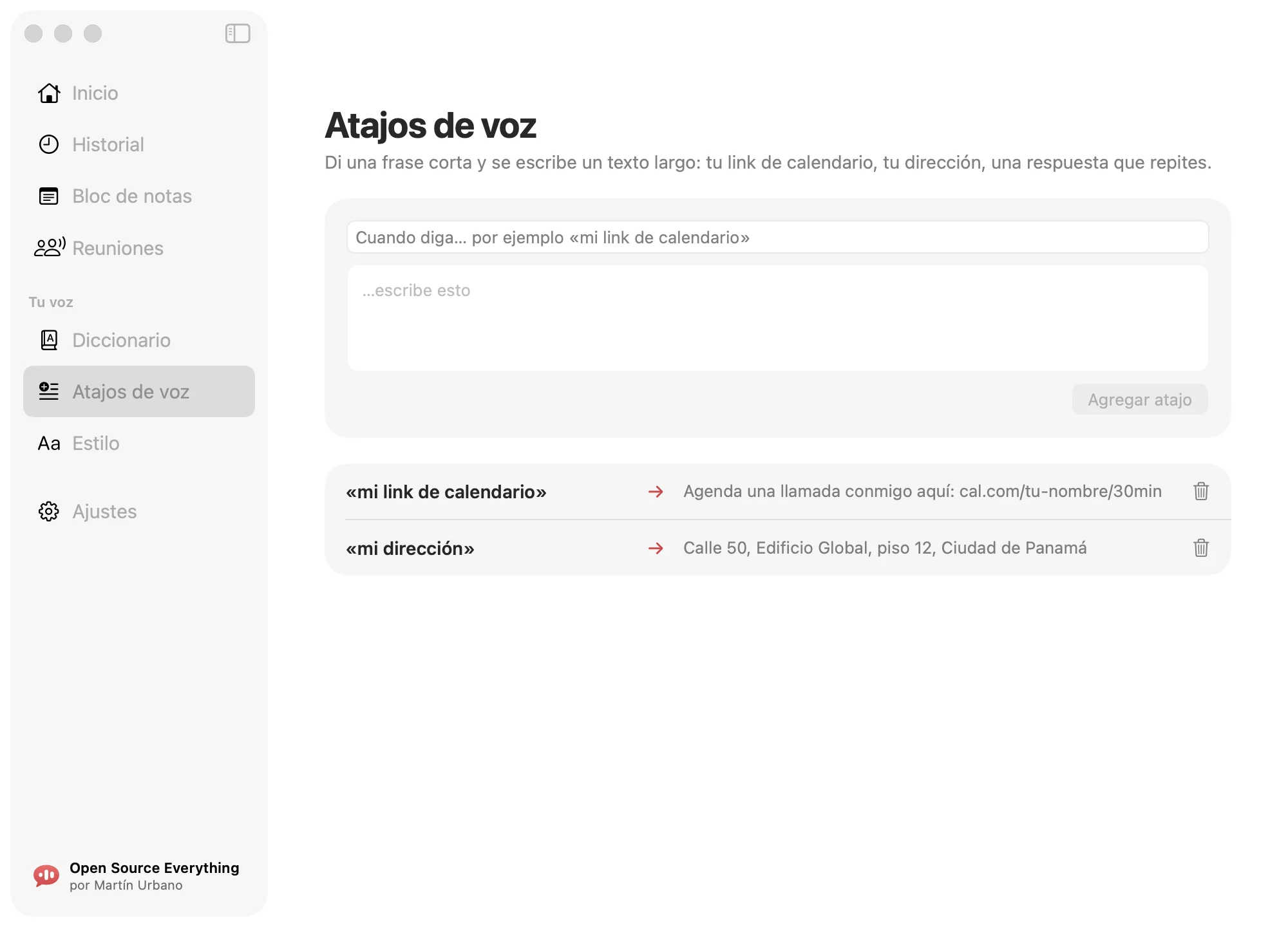
Add your words to the dictionary. Say a short phrase to write a longer text with voice shortcuts. Set a writing style for each kind of app: messages, email, work and notes, everything else.
Meeting summaries, the optional polish and Command Mode use Apple’s on-device model and need macOS 26 with Apple Intelligence. Dictation and filler-word cleanup do not. Filler-word cleanup is rule based, runs on your Mac and is on by default. The optional “Pulir con Apple Intelligence” switch (Polish with Apple Intelligence) is off by default. In Command Mode, select text and speak an instruction to rewrite it.
There is also a scratchpad for your text and a history of your dictations.
Keep your streak.
Stats and streaks are plain counters on your Mac. Dictation history is separate: it is on by default and stores up to 2,000 entries locally. You can turn it off and delete entries one by one.

Your voice stays on your Mac.
- Whisper runs on your Mac.
- Audio is never written to storage.
- History and meeting notes stay on your Mac.
- No account, no analytics, no tracking, no ads.
Open source, for real.
MIT license. Download it, read it, change it. Build it yourself (it needs Xcode 26 or later) or get the .dmg from GitHub Releases. The app inside is signed with a Developer ID and notarized by Apple.
# build it yourself
git clone https://github.com/martinfurbano-ai/speak-away
cd speak-away/app
./scripts/build-app.sh

# result: app/dist/SpeakAway.dmg
Questions
Is it really free?
Yes. Speak Away is free and open source under the MIT license. Download it from GitHub Releases or build it yourself. No account needed.
What do I need to run it?
An Apple Silicon Mac with macOS 14 or later. Dictation works offline after the model download: about 632 MB (precise, default) or 216 MB (fast). The default model downloads when you first open the app, and the other one the first time you pick it. A model downloads again only if its folder on your Mac is missing or incomplete. Optional polish, meeting summaries and Command Mode need macOS 26 with Apple Intelligence.
Does my voice leave my Mac?
No. Whisper processes your voice on your Mac. The Mac app’s only network requests go to Hugging Face, to download the model and, when they are not cached, small tokenizer files. Hugging Face sees those requests as any website would. The default model downloads when you first open the app, and the other one the first time you pick it. A model downloads again only if its folder on your Mac is missing or incomplete.
What does it save?
History is on by default: final and raw dictated text, app name, date and word count, up to 2,000 entries on your Mac. It also keeps stats, meeting notes, scratchpad, dictionary, voice shortcuts, writing styles, settings, the downloaded speech model and a small debug log. A meeting note has no summary until you press “Resumir” (Summarize). Audio is never written to storage.
Which languages?
English and Spanish, with automatic detection. The app’s own menus and screens are in Spanish today.
Does it work on iPhone (coming soon)?
The iPhone app and keyboard are coming soon. They are not released yet.
How do I turn history off or delete my data?
Turn history off in the app, or delete entries one by one. To delete stored data, quit the app first. Save any notes you want to keep elsewhere, then delete ~/Library/Application Support/Speak Away. That folder holds history, dictionary, voice shortcuts, writing styles, scratchpad notes, meeting notes, the downloaded speech model and a small debug log. Stats and settings are in the app’s preferences: run defaults delete com.opensourceeverything.speakaway in Terminal to clear them. You can also uninstall the app.